Flutter Currency Picker Examples
Currency Picker Widget in Flutter
The Currency Picker widget, allows users to select a currency from a list of available currencies.
Introduction
The Currency Picker widget is a pre-built widget in Flutter that enables developers to create a currency picker in their mobile applications. The widget comes with a list of available currencies, which can be customized to suit the needs of the application. The Currency Picker widget is easy to use and can be integrated into any Flutter application with just a few lines of code.
Steps to Implement Currency Picker Widget
Here are the steps to implement the Currency Picker widget in a Flutter application:
- Add the currency_picker package to your pubspec.yaml file.
dependencies:
  currency_picker: ^1.3.0
- Import the currency_picker package in your Dart file.
import 'package:currency_picker/currency_picker.dart';
- Create a CurrencyPickerDialog widget and show it on the screen.
showDialog(
  context: context,
  builder: (BuildContext context) => CurrencyPickerDialog(
    titlePadding: EdgeInsets.all(8.0),
    searchCursorColor: Colors.black,
    searchInputDecoration: InputDecoration(
      hintText: 'Search Currency',
    ),
    isSearchable: true,
    title: Text('Select your currency'),
    onValuePicked: (Currency currency) {
      print('Selected currency: ${currency.name}');
    },
    itemBuilder: (Currency currency) {
      return Container(
        margin: EdgeInsets.symmetric(vertical: 8.0),
        child: ListTile(
          leading: CircleAvatar(
            child: Text(currency.symbol),
          ),
          title: Text(currency.name),
          subtitle: Text(currency.code),
        ),
      );
    },
  ),
);
- Customize the CurrencyPickerDialog widget to suit your needs. You can change the title, search bar, and list item widget to match the design of your application.
More Examples

This tutorial will explore examples related to picking a currency. Rather than manually adding currencies in your app, you could simply use ready-made packages that allow you such a feature.
This example utilizes the flutter_currency_picker package.
flutter_currency_pickeris a flutter package to select a currency from a list of currencies.
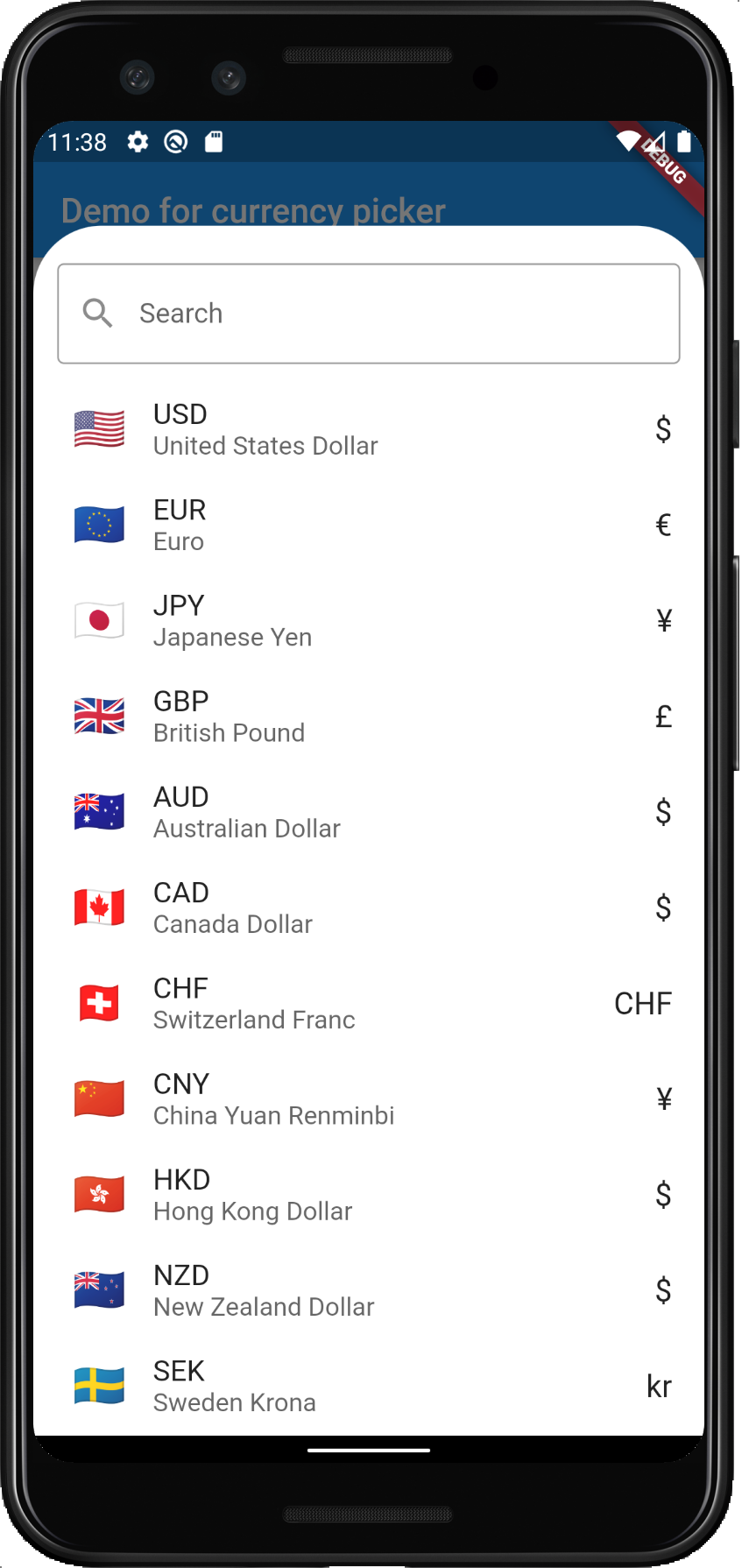
Here's the demo of the example created using this package:
Step 1: Create Project
Start by creating an empty flutter project.
Step 2: Install library
Install the Currency Picker library by declaring it as a dependency in your pubspec.yaml:
currency_picker: ^2.0.5
Step 3: Show Currency Picker
Start by adding import:
import 'package:currency_picker/currency_picker.dart';
Then to show the currency picker simply invoke the showCurrencyPicker() function:
showCurrencyPicker(
   context: context,
   showFlag: true,
   showCurrencyName: true,
   showCurrencyCode: true,
   onSelect: (Currency currency) {
      print('Select currency: ${currency.name}');
   },
);
Full Example
Here's a full example.
Step 1: Create Project
Create a project or download the one provided.
Step 2: Install Library
Install the library as has been discussed.
Step 3: Write Code
Replace your main.dart with the following code:
main.dart
import 'package:currency_picker/currency_picker.dart';
import 'package:flutter/material.dart';
void main() => runApp(MyApp());
class MyApp extends StatelessWidget {
Widget build(BuildContext context) {
return MaterialApp(
title: 'Demo for currency picker package',
theme: ThemeData.light(),
darkTheme: ThemeData.dark(),
home: const HomePage(),
);
}
}
class HomePage extends StatelessWidget {
const HomePage({Key? key}) : super(key: key);
Widget build(BuildContext context) {
return Scaffold(
appBar: AppBar(title: const Text('Demo for currency picker')),
body: Center(
child: ElevatedButton(
onPressed: () {
showCurrencyPicker(
context: context,
showFlag: true,
showCurrencyName: true,
showCurrencyCode: true,
onSelect: (Currency currency) {
print('Select currency: ${currency.name}');
},
favorite: ['SEK'],
);
},
child: const Text('Show currency picker'),
),
),
);
}
}
Run
Copy the code or download it in the link below, build and run.
Reference
Here are the reference links:
| Number | Link |
|---|---|
| 1. | Download Example |
| 2. | Read more |
| 3. | Follow code author |
Conclusion
In conclusion, the Currency Picker widget in Flutter is a powerful tool that enables developers to create a currency picker in their mobile applications. The widget is easy to use and can be customized to match the design of the application. By following the steps outlined in this article, you can implement the Currency Picker widget in your Flutter application.