Flutter CountryPicker Example
An Introduction to CountryPicker Widget in Flutter
Flutter is a popular open-source mobile app development framework that allows developers to build beautiful and high-performance mobile apps for both Android and iOS platforms. It provides a wide range of widgets and tools to make the development process easier and faster.
One such widget is the CountryPicker widget, which allows developers to add a country picker to their Flutter app. This widget provides a list of countries that users can select from, and it also provides other useful information about each country, such as its flag, name, and dialing code.
In this article, we will explore the CountryPicker widget in Flutter and learn how to use it in our own apps.
Using the CountryPicker Widget in Flutter
To use the CountryPicker widget in Flutter, we first need to add the country_picker package to our project. We can do this by adding the following line to our pubspec.yaml file:
dependencies:
  country_picker: ^1.1.0
Once we have added the package, we can import it into our Dart code:
import 'package:country_picker/country_picker.dart';
Now we can use the CountryPicker widget in our app. Here's an example of how to use it:
import 'package:flutter/material.dart';
import 'package:country_picker/country_picker.dart';
class MyHomePage extends StatefulWidget {
_MyHomePageState createState() => _MyHomePageState();
}
class _MyHomePageState extends State<MyHomePage> {
Country _selectedCountry;
void _showCountryPicker() {
showCountryPicker(
context: context,
onSelect: (country) => setState(() => _selectedCountry = country),
);
}
Widget build(BuildContext context) {
return Scaffold(
appBar: AppBar(
title: Text('CountryPicker Example'),
),
body: Center(
child: Column(
mainAxisAlignment: MainAxisAlignment.center,
children: <Widget>[
Text(
_selectedCountry != null
? _selectedCountry.name
: 'Select a country',
),
RaisedButton(
child: Text('Select a country'),
onPressed: _showCountryPicker,
),
],
),
),
);
}
}
In this example, we create a stateful widget called MyHomePage that displays a text widget and a raised button widget. When the user taps the button, we call the _showCountryPicker method, which shows the country picker dialog. When the user selects a country, we update the _selectedCountry variable using the setState method, which triggers a rebuild of the widget.
More Examples
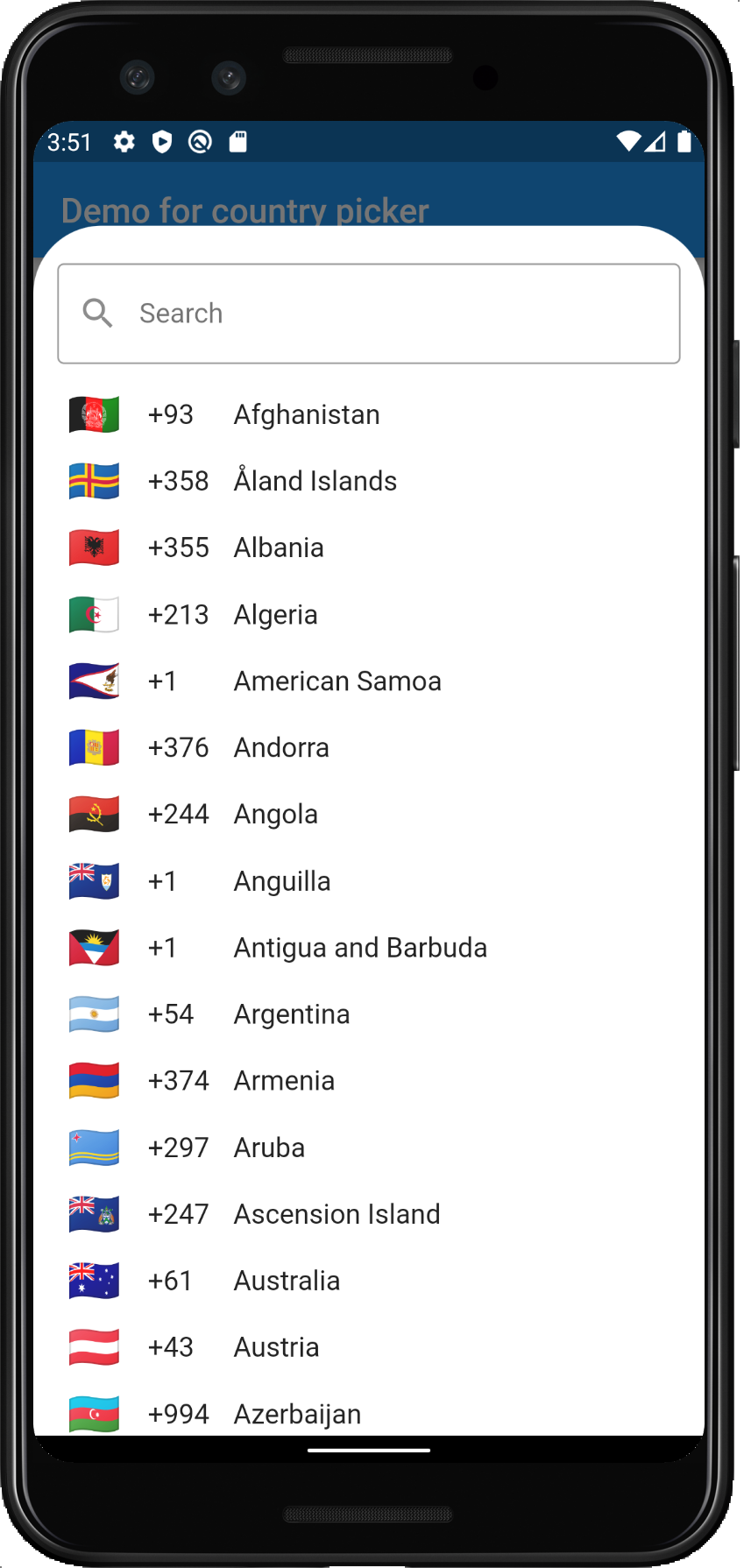
Rather including countries in your app manually, you can use a ready-made picker like the one we will show you today. With such a widget a user can easily pick any country of choice. The country includes the name, flag and country code.
Example 1: Search Countries using Country Picker
This example uses the flutter_country_picker package.
flutter_country_pickeris a flutter package to select a country from a list of countries.
Here is it in use:
Step 1: Create Project
Start by creating an empty flutter project.
Step 2: Install it
Declare it in your pubspec.yaml as a dependency:
country_picker: ^2.0.8
Step 3: Show Country Picker
First import the package:
import 'package:country_picker/country_picker.dart';
Then simply invoke the showCountryPicker() method:
showCountryPicker(
  context: context,
  showPhoneCode: true, // optional. Shows phone code before the country name.
  onSelect: (Country country) {
    print('Select country: ${country.displayName}');
  },
);
Full Example
Here is the full example:
Step 1: Create Project
Create an empty project or download the one provided.
Step 2: Install Library
Install the library as has been discussed. Then install the flutter_localizations from the flutter SDK:
dependencies:
  flutter:
    sdk: flutter
  country_picker: ^2.0.8
  flutter_localizations:
    sdk: flutter
Step 3: Write Code
Replace your main.dart with the following code:
main.dart
import 'package:country_picker/country_picker.dart';
import 'package:flutter/cupertino.dart';
import 'package:flutter/material.dart';
import 'package:flutter_localizations/flutter_localizations.dart';
void main() => runApp(MyApp());
class MyApp extends StatelessWidget {
Widget build(BuildContext context) {
return MaterialApp(
title: 'Demo for country picker package',
theme: ThemeData(
primarySwatch: Colors.blue,
visualDensity: VisualDensity.adaptivePlatformDensity,
),
supportedLocales: [
const Locale('en'),
const Locale('ar'),
const Locale('es'),
const Locale('el'),
const Locale('nb'),
const Locale('nn'),
const Locale('pl'),
const Locale('pt'),
const Locale('ru'),
const Locale('hi'),
const Locale('ne'),
const Locale('uk'),
const Locale('hr'),
const Locale('tr'),
const Locale.fromSubtags(languageCode: 'zh', scriptCode: 'Hans'), // Generic Simplified Chinese 'zh_Hans'
const Locale.fromSubtags(languageCode: 'zh', scriptCode: 'Hant'), // Generic traditional Chinese 'zh_Hant'
],
localizationsDelegates: [
CountryLocalizations.delegate,
GlobalMaterialLocalizations.delegate,
GlobalCupertinoLocalizations.delegate,
GlobalWidgetsLocalizations.delegate,
],
home: HomePage(),
);
}
}
class HomePage extends StatelessWidget {
HomePage({Key? key}) : super(key: key);
Widget build(BuildContext context) {
return Scaffold(
appBar: AppBar(title: Text('Demo for country picker')),
body: Center(
child: ElevatedButton(
onPressed: () {
showCountryPicker(
context: context,
//Optional. Can be used to exclude(remove) one ore more country from the countries list (optional).
exclude: <String>['KN', 'MF'],
//Optional. Shows phone code before the country name.
showPhoneCode: true,
onSelect: (Country country) {
print('Select country: ${country.displayName}');
},
// Optional. Sets the theme for the country list picker.
countryListTheme: CountryListThemeData(
// Optional. Sets the border radius for the bottomsheet.
borderRadius: BorderRadius.only(
topLeft: Radius.circular(40.0),
topRight: Radius.circular(40.0),
),
// Optional. Styles the search field.
inputDecoration: InputDecoration(
labelText: 'Search',
hintText: 'Start typing to search',
prefixIcon: const Icon(Icons.search),
border: OutlineInputBorder(
borderSide: BorderSide(
color: const Color(0xFF8C98A8).withOpacity(0.2),
),
),
),
),
);
},
child: const Text('Show country picker'),
),
),
);
}
}
Run
Copy the code or download it in the link below, build and run.
Reference
Here are the reference links:
| Number | Link |
|---|---|
| 1. | Download Example |
| 2. | [Read(https://github.com/Daniel-Ioannou/flutter_country_picker)] more |
| 3. | Follow code author |
Conclusion
The CountryPicker widget in Flutter is a useful tool for adding a country picker to our apps. It provides a list of countries that users can select from, and it also provides other useful information about each country, such as its flag, name, and dialing code. By following the steps outlined in this article, we can easily add the CountryPicker widget to our own Flutter apps and enhance the user experience.